
SBTET Attendance Calculator – Check Attendance Percentage
The State Board of Technical Education and Training is very strict about attendance and doesn’t allow students to appear for exams with less than the prescribed attendance. Some students are uncertain about whether their attendance meets the criteria or not. They need to spend time calculating attendance percentage manually, and there are still chances of errors. The SBTET Attendance Calculator is designed to solve this problem by providing highly accurate and instant results.
This calculator can calculate the attendance percentage automatically without human error. Students just need to enter attendance details and hit the calculate button. The calculator will calculate the percentage and display the result within seconds. With the attendance percentage, students can also check the number of classes they need to attend to meet the attendance criteria or the number of classes that can be skipped safely. Those looking to calculate attendance percentage according to KL University’s requirements can use the KL Attendance Calculator.
How to Use the SBTET Attendance Calculator?
Using this calculator is one of the simplest tasks in the world, as you just need to enter some details and hit a button. The next work will be done by the calculator, and it will show your required results. As this calculator is specific to SBTET students, students of other institutes can use this Attendance Calculator to calculate their attendance percentage. The following is the detailed method to use the calculator.
- Fill Total Attendance Field: Enter the total number of classes held from the start of the semester. You will count all the classes that you’ve attended or not.
- Fill Classes Attended Field: In the classes attended field, enter the number of classes you’ve attended.
- Fill Required Attendance Field: Confirm the minimum attendance percentage required for exam appearance from your institute. Enter this percentage in the required attendance field.
- Hit the Calculate Button: When you fill these fields, press the calculate button, and the SBTET Attendance Calculator will calculate automatically.
What Does the SBTET Attendance Calculator Show?
When you click the calculate button, the calculator will show you the following results.
- The SBTET Attendance Calculator will do an automatic calculation and show your current attendance percentage.
- The calculator will highlight whether you meet the minimum attendance criteria or not.
- If you have an attendance deficit, it will show the number of classes that you need to attend.
- If you have a good percentage, it can guide you on the number of classes that you can skip safely.
Example of Using this Calculator:
It is easier to understand anything through an example, so assume that you have attended 36 classes out of 50 total classes. In this scenario, we will consider the required percentage to be 75% and then fill in the details in the calculator. To get the percentage without any tension, you will click on the calculate button, and it will show that your attendance percentage is 72%. After this, it tells you that you must attend 6 more classes to meet the threshold.
Overview of SBTET Attendance Calculator
This calculator is a user-friendly online tool that accurately calculates the attendance percentage. It calculates the percentage by comparing the total number of classes with the number of classes you’ve attended. You just have to provide the total number of classes, the number of classes you’ve attended and the required percentage. It is equally beneficial for students who want to calculate attendance percentage, teachers who want to keep track of students’ progress, and the SBTET administrators who want quick reports.
How Does the SBTET Attendance Calculator Work?
The magic behind this calculator is pretty straightforward math. When you enter the attendance details, it simply applies the attendance percentage formula and shows you the result. The formula to calculate the percentage is as follows:
Attendance Percentage Calculation Formula
Attendance % = (Classes Attended ÷ Total classes) × 100
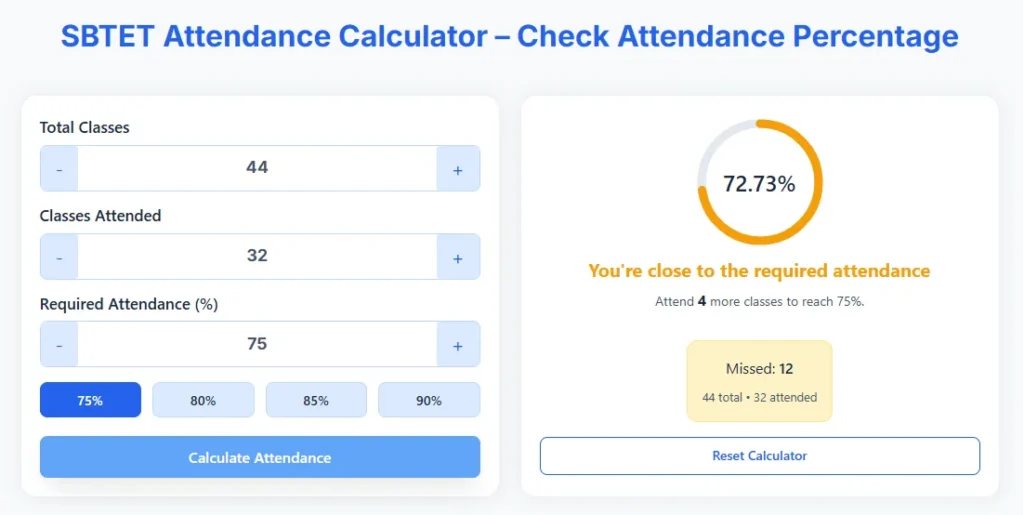
To figure out how it works, say you have entered 32 in the attended classes section, 44 in the total classes box, and set the required percentage to 75%. The calculation process begins as soon as you click the Calculate button, which divides 32 by 44 in real time and multiplies the result by 100 to get the 72.73% answer. Now, to find out how many more classes you need to attend to meet the goal is calculated by comparing the calculated and the required percentage, and in this case, the answer will be 4.
Features of the SBTET Attendance Percentage Calculator
This calculator has every smart feature that you need in an Attendance Calculator. The following are some features of this calculator:
- Friendly Interface: This calculator provides a user-friendly interface. The user can check the attendance percentage without any effort by just entering the total classes, attended classes, and the required percentage. It will show the calculated results in a moment.
- Accurate Calculation: The working of this calculator is automated, which means you don’t need to put any values manually into the formula. As there is no human calculation, there is no chance of human error, so it gives the results with more accuracy.
- Accessible on every device: It is accessible anywhere and anytime. You can use this calculator on both mobile and desktop.
- Quick Results: When you press the calculate button, it will instantly show you the results without any delay.
Benefits of Using this Calculator
Using this calculator helps students to track their attendance and plan accordingly. Here are some benefits of using this calculator:
- Time-saving: Calculating attendance manually takes a lot of time, but using the calculator saves time as it provides the result in just one click.
- Helps Maintain Attendance: As the calculator displays whether you meet the SBTET attendance criteria or not, you can make quick decisions to improve and maintain your percentage. You can also check the classes that you can miss safely.
- Easy to Use: You don’t need to put values in the formula or do manual calculations. It provides ease as the user just has to enter values and press the calculate button.
TS SBTET Diploma Attendance Rules
The State Board of Technical Education and Training, Telangana, also follows strict attendance regulations, as does any other good institute. To better understand these principles, we will divide them into three categories.
- If your attendance percentage is above 75%, you are eligible for exams. You just need to pay the 650 rupees exam fee and can download the hall ticket after fee submission.
- Students whose attendance is between 65% and 74.9% can get some relaxation through condonation. But they will have to provide documents to prove their point and pay an additional fine of Rs. 600.
- In case a student has a percentage even less than 65%, he/she will not be allowed to sit for exams in any case. In that case, students have to wait for the next attempt.
Important Attendance Guidelines:
- The minimum attendance required to sit for the diploma examination without any penalty is 75%.
- The attendance percentage will be calculated on the last working day, based on the attended days divided by the total working days.
- Note that SBTET’s official records add extra “presumptive attendance” days to your attended total, so your real percentage may end up a bit higher than this calculator shows.
- To understand the exam fee structure according to your attendance percentage, see this table:
Attendance Percentage | Exam Fee Details |
|---|---|
75% or above | Rs. 650 exam fee |
65% to 74.9% | 650 exam fee + 600 condonation fee |
Less than 65% | Ineligible for exams |
Disclaimer: Attendance regulations and fee structures may change over time. Students should verify the latest attendance requirements, condonation rules, and examination fees through official TS SBTET notifications or their institution.
How to Check the Attendance of SBTET Diploma?
You can check your attendance either from your teacher or by following these steps:
- Go to the official SBTET Portal.
- Enter your PIN.
- Click on the “Get Report” Button.
- You can see your attendance details from the start of the semester.
- You can also download or print it.
Summary
The attendance policies of SBTET urge students to calculate their attendance percentage regularly. The TS SBTET Attendance Calculator makes the process easy by automatically calculating the percentage in seconds. It also displays the number of classes that can be missed or the classes that need to be attended to meet the attendance requirement.