
SRM Attendance Calculator – Track & Stay Above 75%
There are strict attendance policies at the SRM University, and students with less than the required percentage are not allowed to appear for exams. Thus, students need to maintain their attendance throughout the semester, and they calculate their percentage by hand, which not only consumes their time but also introduces the possibility of errors. The SRM Attendance Calculator makes life easier for students, as it can calculate an accurate attendance percentage in no time and without any hard work.
This calculator is very helpful for students, as they just need to provide attendance details and hit the calculate button. It will do the next task by displaying the percentage instantly, and also the number of classes you need to attend to achieve the percentage goal. It will also show the classes you can skip without dropping your percentage below the required limit, if you already have a good percentage. So, instead of stressing over manual calculations, use this calculator and plan your attendance accordingly. Students enrolled in other universities may benefit from institution-specific tools such as the VIT Attendance Calculator for attendance tracking.
How to Use the SRM Attendance Calculator?
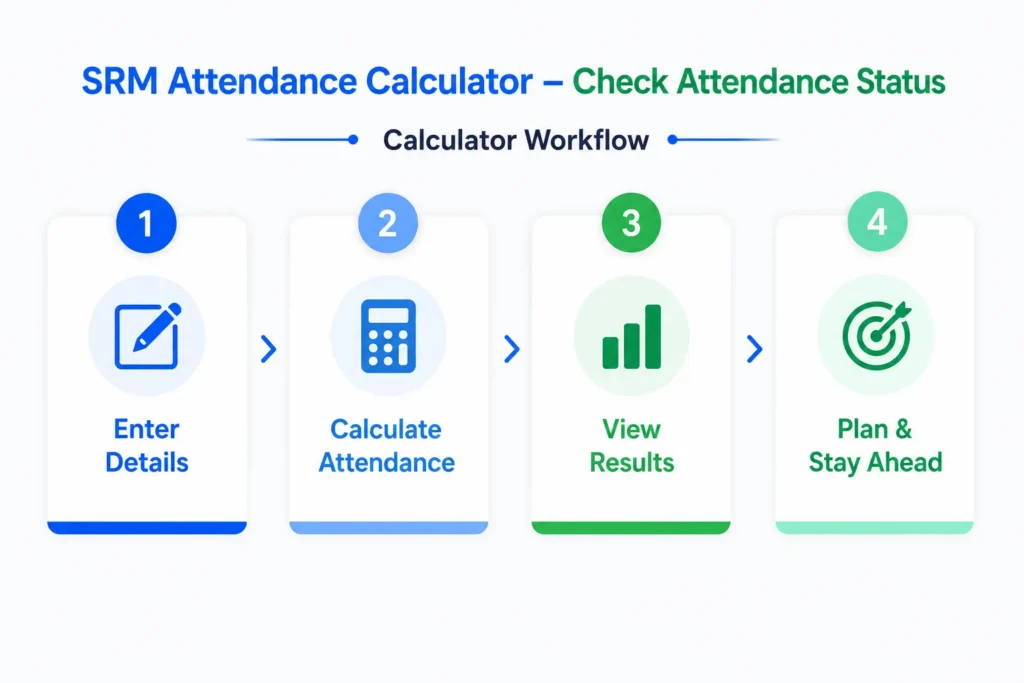
This attendance calculator is designed in a way to give a user-friendly and smooth experience. The method to use this calculator is effortless and uncomplicated. If you want to use a general attendance percentage tool instead of this SRM-specific calculator, you can use our general Attendance Percentage Calculator. Here are the simple steps that you need to follow:
- Enter Classes Attended by You: In the attended classes field, enter the number of classes you have attended so far. Also, confirm this number with your course teacher.
- Enter Total Classes: Enter the total number of classes held. This includes all the classes that you have attended or missed.
- Enter Required Percentage: In the required percentage section, enter the minimum attendance required by SRM University. This percentage can vary from department to department.
- Click the Calculate Button: After entering data in all the above fields, press the Calculate button, which will calculate and display your percentage instantly.
- View Result: The SRM Attendance Calculator will show you the attendance percentage and the number of classes that can be missed if your percentage is good. If your attendance is less than the required percentage, it will show the number of classes that you need to attend.
Example Result Calculation:
Suppose these are your attendance details:
Total Classes = 50
Attended Classes = 35
Required percentage = 75%
When you enter this data into the calculator and press the calculate button, it will show you these results.
Attendance Percentage = 70%
More continuous classes to attend to meet the goal = 10
What is the SRM Attendance Calculator?
This calculator is used to calculate the attendance percentage within seconds without any manual work. The only task for you is to enter the number of classes attended by you, the total classes held, and the required percentage. Then the calculator will do the calculation quickly and show you the results. Besides the percentage, it also shows the number of classes that can be skipped or the additional classes that the student needs to attend.
How Does the SRM Attendance Calculator Work?
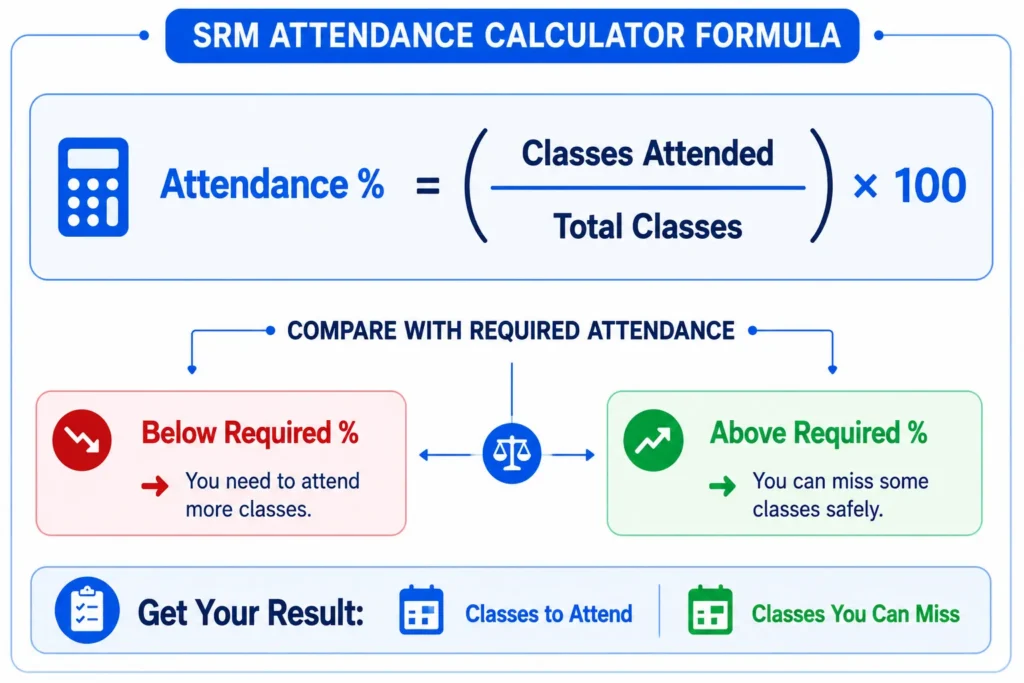
The working of this calculator is very simple and easy to understand. It works on the basis of the attendance percentage formula. When you enter data in all the required fields and press the calculate button, it will divide the number of classes attended by you by the total number of classes. The result is then multiplied by 100 to find the percentage.
The calculator also shows the number of classes that can be skipped or the number of classes that the student needs to attend to meet the university criteria. It works by matching the current percentage with the required percentage. Then, if the current percentage is less than the required percentage, it will show the number of classes that you need to attend. If the current attendance is greater than the required minimum attendance, it will display the number of classes that can be missed safely.
How to Calculate Attendance Percentage Manually?
In the manual process, you need to put attendance details in the attendance percentage formula and do the calculation by yourself. The first step is to count the total number of classes and also the classes that you have attended. As the percentage will be calculated based on these numbers, try to validate it with your teacher’s record. Once you get the data, divide the number of attended classes by the number of overall classes and multiply the result by hundred to get the percentage.
Attendance Percentage Calculation Formula
Attendance % = (Number of classes attended ÷ Total number of classes) × 100
To understand this process well, we will consider a case where the university held 50 total classes, and you were present in only 42 classes. To calculate the percentage, you will divide 42 by 50 and multiply the answer by 100. The resulting percentage will be 84%.
Attendance Policy of SRM University
At the SRM Institute of Science and Technology, authorities focus on the students’ engagement in studies and want to give them a real learning experience. This is the reason that the university has strict attendance regulations, and it is mandatory for students to follow these rules. Here are some of its key rules:
- Students can’t take exams if they fail to meet the minimum 75% attendance threshold. This percentage will be calculated for each subject separately, and students must maintain this percentage for every course. So having overall good attendance doesn’t guarantee your exam eligibility if you have an attendance shortage in even one subject.
- There are some exceptional cases where students can be allowed to sit in the examination cell even if their attendance is less than 75%. These cases can be medical or any other serious case, but students have to submit proper documents for this relief. In any case, this condonation cannot exceed 10%.
- Attending practice exams also counts toward your attendance, so if your percentage is close to the cutoff, this can give it a boost before the final exams.
Important Note: Attendance policies may change over time. Students should verify the latest attendance requirements through official SRM University notifications, department guidelines, or faculty announcements.
Benefits of Using the SRM University Attendance Calculator
This Calculator provides a smooth experience for calculating the percentage. The process for calculation is straightforward and obvious. Here are some benefits of using this calculator:
- Accuracy: The SRM Attendance Calculator will provide results with accuracy. As the calculation will be done automatically without any manual work, it helps avoid manual mistakes.
- Saves Time: It is time-saving for students as they just have to enter the data and press a button, and the calculator will provide instant results. They don’t have to spend time calculating the percentage manually.
- Accessibility: It provides convenience to users, and they can use the calculator anytime and anywhere. They can just pull out their mobile or laptop and calculate their attendance.
- Helps in Quick Decisions: Checking the percentage regularly helps the students to monitor their progress and take immediate steps if they are falling short on attendance. It helps them make quicker and better decisions about attendance.
Key Features of SRM Attendance Calculator
This Calculator has almost every feature that a student needs to plan future attendance. Here we will discuss some of them:
- Automatic Attendance Calculation: The calculator gives instant automatic results with one click without the need for manual calculation.
- Simple Input Fields: The input fields where you will type the data are user-friendly and have increase and decrease buttons as well.
- Attendance Status Indicator: It will also indicate whether you meet the attendance criteria or not.
- Estimate Additional Classes: If the student’s attendance is less than the required percentage, then the calculator will also show the number of additional classes that he/she needs to attend to meet the minimum criteria.
When Should SRM Students Check Their Attendance?
Smart students start tracking their attendance from the start of the semester as a precaution. They can plan their future attendance to maintain their percentage. Here, we will discuss some scenarios to check the percentage:
- The middle of the semester is a critical phase where students’ slightest mistakes can throw them off track. So students should start tracking weekly to check whether they are on the safe side or not.
- Sometimes students miss many classes due to a health condition or any other genuine reason. So they should check their percentage to see where they stand now.
- Before missing a class, students should check their percentage to determine whether they can maintain their attendance after this break.
- During the final weeks of the semester, students should check their percentage as there is very little time to recover the previous losses.
Conclusion
The SRM Attendance Calculator helps you to instantly calculate attendance percentage by filling in simple fields. It also shows you the number of classes you must attend or the classes you can miss safely. Students need this because of the institute’s strict attendance policies that must be fulfilled to be eligible for exams.